| 所在主题: | |
| 文件名: Manual_VOSviewer_1.3.1.pdf | |
| 资料下载链接地址: https://bbs.pinggu.org/a-2111533.html | |
| 附件大小: | |
|
VOSviewer_VOSviewer手册_VOSviewer中文手册_VOSviewer使用教程
VOSviewer is a freely available computer program that can be used for the following purposes: VOSviewer can be used to construct maps based on network data. Maps are constructed using the VOS mapping technique and the VOS clustering technique. VOSviewer can be used to view and explore maps. It can show a map in various different ways, each emphasizing a different aspect of the map. It offers functionality such as zooming, scrolling, and searching, which facilitates the detailed examination of a map. VOSviewer is primarily intended to be used for analyzing bibliometric networks. The program can for instance be used to construct maps of publications, authors, or journals based on a co-citation network or to construct maps of keywords based on a co-occurrence network. Various examples of maps constructed using VOSviewer are available here. VOSviewer has been written in the Java programming language and runs on most hardware and operating system platforms. VOSviewer can be downloaded here. The program can also be started directly by clicking the Launch button below.   In the label view, items are indicated by their label and, by default, also by a circle. For each item, the font size of the item’s label and the size of the item’s circle depend on the weight of the item.3 If items have been assigned to clusters, each item’s circle is displayed in the color of the cluster to which the item belongs. Alternatively, if colors have been specified for each item individually (using the red, green, and blue columns in a map file; see Subsection 3.1), each item’s circle is displayed in the color of the item. By default, to avoid overlapping labels, only a subset of all labels is visible. Also, by default, no lines between items are displayed. However, this can be changed on the Options tab in the action panel. The label view is particularly useful for a detailed examination of a map. 在标签模式(label view)图中,每个节点的标签和其对应的圆环是缺省状态。对于每个节点,其标签的大小和圆环的大小与其权重相关。如果节点被划分为不同的聚类,其圆环呈现不同颜色。系统提供三种配色方案:红、绿、蓝;白、蓝、紫色;白、灰黑。 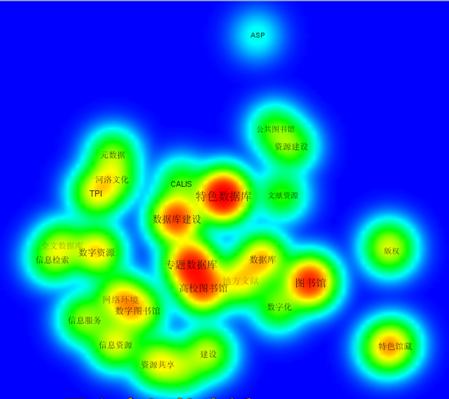 下面是从软件使用说明文档中摘出的部分内容,下面中英文不是完全。后面文字只有笔者在衩次使用该软件的一些理解,不一定完全正确,供大家参考。 In the density view, items are indicated by their label in a similar way as in the label view. Each point in a map has a color that depends on the density of items at that point. By default, this color is somewhere in between red and blue. The larger the number of items in the neighborhood of a point and the higher the weights of the items, the closer the color of the point is to red. Conversely, the smaller the number of items in the neighborhood of a point and the lower the weights of the items, the closer the color of the point is to blue. The density view is particularly useful to get a quick overview of the important areas of a map. 在密度模式(density view)图中,每个节点标识与标签模式下相同。图中的每个节点根据其密度有一种颜色。图中缺省颜色是红和蓝。一个节点越大,表示其权重越大,其颜色越接近于红色。相反,如果其权重越小,则其颜色越接近于蓝色。这种模式对于快速获得一幅图中的重要内容的概貌非常有用。  • Cluster Density View. The cluster density view is available only if items have been assigned to clusters. The cluster density view is similar to the ordinary density view except that the density of items is displayed separately for each cluster of items. In the cluster density view, the color of a point in a map is close to the color of a certain cluster if there are a large number of items belonging to that cluster in the neighborhood of the point. Like in the ordinary density view, items with high weights count more heavily than items with low weights. The cluster density view is particularly useful to get a quick overview, for each cluster separately, of the important areas of a map. 在密度聚类(Cluster Density View)图中,只有节点被分成了不同聚类族才有效。这在这种模式下,每个节点的颜色和其特定的聚类族一致。这种模式对于快速发现每个聚类族非常有用。  • Scatter View. In the scatter view, items are indicated by a small circle. If items have been assigned to clusters, each item’s circle is displayed in the color of the cluster to which the item belongs. Alternatively, if colors have been specified for each item individually (using the red, green, and blue columns in a map file; each item’s circle is displayed in the color of the item. No labels are displayed in the scatter view. By default, lines between items are not displayed either, but this can be changed on the Options tab in the action panel. The scatter view can be useful to get an overview of the general structure of a map. The way in which a map is shown in the scatter view is similar to the way in which a map is shown in the overview panel discussed below. 散点模式(Scatter View)图中,每个节点都表现为一个小的圆环。如果节点被聚为不同的类,每个圆环用同样的颜色来表示。 上面图中所展现的是我国在特色数据库研究过程中使用较多的关键词共现而成的共词网络图。 软件初次试用,一些功能还没有完全理解,面图中所表现内容暂时不做解释。 下面是用UCINET得到的共词网络图,为了更好地观察图中的内容,后期对原图节点位置进行了手工调整。上面的图都不能手工调整,但其聚类效果还不错。  为了便于大家验证,下附本文图中对应的原始数据。 ASP 0 0 0 0 0 0 0 0 0 0 0 0 0 0 0 0 0 0 0 1 0 0 0 0 0 0 0 0 0 0 CALIS 0 0 0 0 0 0 0 1 0 0 0 0 0 1 0 0 0 0 0 1 0 0 0 0 0 0 0 1 0 0 TPI 0 0 0 0 0 0 0 1 0 1 0 0 0 1 0 1 1 0 0 1 0 0 0 0 0 0 1 1 0 0 版权 0 0 0 0 0 0 1 1 0 0 0 0 0 0 0 0 0 0 0 1 1 0 0 0 0 0 0 0 0 0 党校图书馆 0 0 0 0 0 0 0 0 0 0 1 0 0 1 0 0 0 0 0 1 0 0 0 0 0 0 0 1 1 0 地方文献 0 0 0 0 0 0 0 1 0 1 0 0 1 1 1 0 0 0 1 1 0 1 0 0 0 0 0 1 0 0 高校 0 0 0 1 0 0 0 0 0 0 0 0 1 0 0 0 0 0 0 1 1 0 0 0 0 0 0 0 0 0 高校图书馆 0 1 1 1 0 1 0 0 0 0 1 1 1 1 1 0 1 1 0 1 0 1 0 1 0 1 0 1 1 0 公共图书馆 0 0 0 0 0 0 0 0 0 0 0 0 0 1 0 0 0 0 0 1 0 0 0 0 0 0 0 1 0 1 河洛文化 0 0 1 0 0 1 0 0 0 0 0 0 0 1 0 0 1 0 0 1 0 0 0 0 0 0 1 0 0 0 建设 0 0 0 0 1 0 0 1 0 0 0 0 1 0 0 1 0 0 0 1 1 0 0 0 0 0 0 1 0 0 全文数据库 0 0 0 0 0 0 0 1 0 0 0 0 0 1 0 0 0 0 0 1 0 0 0 0 1 0 0 1 0 0 数据库 0 0 0 0 0 1 1 1 0 0 1 0 0 0 0 1 1 0 0 1 1 1 0 0 0 0 0 1 0 1 数据库建设 0 1 1 0 1 1 0 1 1 1 0 1 0 0 0 1 0 0 0 1 1 1 1 0 0 1 1 1 1 1 数字化 0 0 0 0 0 1 0 1 0 0 0 0 0 0 0 0 0 0 0 1 1 0 0 0 0 0 0 1 0 0 数字图书馆 0 0 1 0 0 0 0 0 0 0 1 0 1 1 0 0 1 0 0 1 0 0 0 0 0 1 0 1 1 0 数字资源 0 0 1 0 0 0 0 1 0 1 0 0 1 0 0 1 0 0 0 1 1 0 0 1 1 0 0 1 0 0 特色服务 0 0 0 0 0 0 0 1 0 0 0 0 0 0 0 0 0 0 3 1 1 0 0 0 0 0 0 1 0 0 特色馆藏 0 0 0 0 0 1 0 0 0 0 0 0 0 0 0 0 0 1 0 0 1 0 0 0 0 0 0 0 0 0 特色数据库 1 1 1 1 1 1 1 1 1 1 1 1 1 1 1 1 1 1 0 0 1 1 1 1 1 1 1 1 1 1 图书馆 0 0 0 1 0 0 1 0 0 0 1 0 1 1 1 0 1 1 8 1 0 1 1 0 0 1 1 1 1 1 网络环境 0 0 0 0 0 1 0 1 0 0 0 0 1 1 0 0 0 0 0 1 1 0 0 1 1 1 0 0 0 0 文献资源 0 0 0 0 0 0 0 0 0 0 0 0 0 1 0 0 0 0 0 1 1 0 0 0 0 0 0 1 0 0 信息服务 0 0 0 0 0 0 0 1 0 0 0 0 0 0 0 0 1 0 0 1 0 1 0 0 0 1 0 1 0 0 信息检索 0 0 0 0 0 0 0 0 0 0 0 1 0 0 0 0 1 0 0 1 0 1 0 0 0 0 0 1 0 0 信息资源 0 0 0 0 0 0 0 1 0 0 0 0 0 1 0 1 0 0 0 1 1 1 0 1 0 0 0 0 1 0 元数据 0 0 1 0 0 0 0 0 0 1 0 0 0 1 0 0 0 0 0 1 1 0 0 0 0 0 0 0 0 0 专题数据库 0 1 1 0 1 1 0 1 1 0 1 1 1 1 1 1 1 1 0 1 1 0 1 1 1 0 0 0 1 0 资源共享 0 0 0 0 1 0 0 1 0 0 0 0 0 1 0 1 0 0 0 1 1 0 0 0 0 1 0 1 0 0 资源建设 0 0 0 0 0 0 0 0 1 0 0 0 1 1 0 0 0 0 0 1 1 0 0 0 0 0 0 0 0 0 上面数据来源及说明参见拙文:魏瑞斌.社会网络分析在关键词网络分析中的实证研究.情报杂志,2009(9) 另一篇参考文献:廖胜姣.科学知识图谱绘制工具VOSviewer与Citespace 的比较研究,科技情报开发与经济,2011,21(7):137-139 如果大家对这款工具感兴趣,可以下载看看 |
|
 熟悉论坛请点击新手指南
|
|
| 下载说明 | |
|
1、论坛支持迅雷和网际快车等p2p多线程软件下载,请在上面选择下载通道单击右健下载即可。 2、论坛会定期自动批量更新下载地址,所以请不要浪费时间盗链论坛资源,盗链地址会很快失效。 3、本站为非盈利性质的学术交流网站,鼓励和保护原创作品,拒绝未经版权人许可的上传行为。本站如接到版权人发出的合格侵权通知,将积极的采取必要措施;同时,本站也将在技术手段和能力范围内,履行版权保护的注意义务。 (如有侵权,欢迎举报) |
|

京ICP备16021002号-2 京B2-20170662号
 京公网安备 11010802022788号
论坛法律顾问:王进律师
知识产权保护声明
免责及隐私声明
用户协议
京公网安备 11010802022788号
论坛法律顾问:王进律师
知识产权保护声明
免责及隐私声明
用户协议




