| 所在主题: | |
| 文件名: Report by the AEA Data Editor pandp.110.764.pdf | |
| 资料下载链接地址: https://bbs.pinggu.org/a-3243238.html | |
| 附件大小: | |
|
https://blog.stata.com/2020/06/04/revealed-preference-stata-for-reproducible-research/
Revealed preference: Stata for reproducible research4 June 2020Enrique Pinzon, Associate Director EconometricsGo to comments
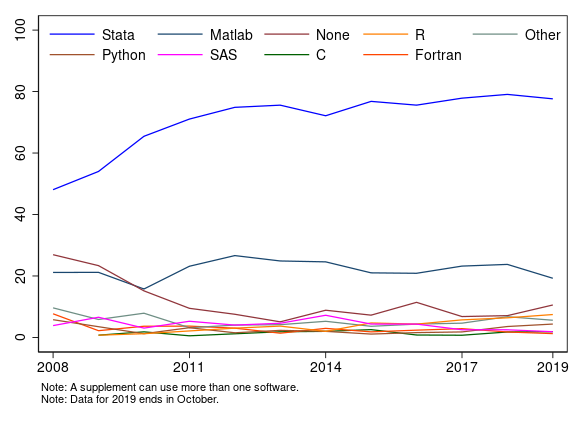
Tweet I care about reproducible research. Anyone who has ever been a research assistant or tried to follow the path set by other researchers also cares. Sometimes, reproducing others’ results is a frustrating task; sometimes, it is outright impossible. Yet sometimes, it is satisfyingly simple. In my experience, reproducing results is easy when it involves a Stata do-file. I believe this is true even beyond my personal bias (I work for Stata and used the software regularly before that). A recent article published by the American Economic Association (AEA), Vilhuber, Turrito, and Welch (2020), shows that Stata is the preferred package among economists, and I believe reproducibility is a big reason why. The AEA established reproducibility guidelines in 2008. Recently, it updated its guidelines to require authors not only to make data and analysis available but also to provide the code used to clean the data and the raw data, whenever feasible. Now, the editorial process includes an AEA data editor who verifies that the information provided by the authors is sufficient to replicate the results in the paper. Vilhuber, Turrito, and Welch (2020)show that since the inception of the policy, Stata has been used in 73% of the supplements provided by the authors. The usage has been increasing over the span of the policy. The graph below shows the percentage of data supplements in which different software packages are used. These percentages may add up to more than 100% because content from more than one software package may be submitted in each supplement. Figure 1: Percentage of software usage by year in AEA supplements
This is not a surprise to anyone who has used Stata. I believe one important reason researchers choose Stata is that reproducing your results is easy. Case in point is the graph above. To get the data and reproduce the graph, you just need to run the do-file, which I discuss in Appendix I. If you want to create a reproducible report, see my discussion in Appendix II. Appendix I: Explaining the do-fileThe do-file below mainly uses three commands: import delimited, which I use to get the comma-separated value dataset used for the graph; xtline, which I use to generate the graph; and egen, which helps me to generate a numeric categorical variable from a string variable using the group function. The other commands I use simplify readability, allow me to modify the code, and help me display results. Line 1 is there for reproducibility. Stata is the only package I am aware of with integrated version control ensuring that scripts written as long ago as 2008, and indeed, even earlier, can still be used to reproduce their results in the modern version of the software. Lines 5 to 7 create locals for the location of the files. I use them in my call to import delimited. Line 16 creates a categorical variable from a string variable. Each category corresponds to a software package. In the next line, I keep a subset of the data. The data I keep correspond to the time period since the AEA implemented its data policy. In line 21, I use xtset to declare data as a panel and then to be able to use xtline. In line 22, I change the default Stata graphic scheme. Stata has multiple schemes, and you could even write one that best represents your preferences. I like the simplicity of s1color. The remaining code reproduces figure 1.
Appendix II: Making it a reproducible document You can create a reproducible report in Word, Excel, PDF, and HTML using Stata. By reproducible, I mean that you can run a do-file that produces Stata results and outputs them into the format you want. I want to create an HTML document. I save a do-file as a text file and give it the name aea.txt. Then, I type dyndoc “aea.txt”, replace. I generate an HTML document. Aside from aea.txt, I use two other files to produce my HTML document. First, I create a header.txt file. The header.txt file contains HTML code to include at the top of the target HTML file. The header refers to the second file, stmarkdown.css, which is a style sheet that defines how the HTML document is to be formatted. Now that I have my HTML documents, with Stata’s reporting tools, I can migrate from HTML to Word using one line of code, html2docx aea.html, saving(aea.docx) replace, and from Word to PDF, again, with one line of code, docx2pdf aea.docx, saving (aea.pdf) replace. ReferenceVilhuber, L., J. Turrito, and K. Welch. 2020. Report by the AEA Data Editor. AEA Papers and Proceedings 110: 764–775. https://doi.org/10.1257/pandp.110.764. |
|
 熟悉论坛请点击新手指南
|
|
| 下载说明 | |
|
1、论坛支持迅雷和网际快车等p2p多线程软件下载,请在上面选择下载通道单击右健下载即可。 2、论坛会定期自动批量更新下载地址,所以请不要浪费时间盗链论坛资源,盗链地址会很快失效。 3、本站为非盈利性质的学术交流网站,鼓励和保护原创作品,拒绝未经版权人许可的上传行为。本站如接到版权人发出的合格侵权通知,将积极的采取必要措施;同时,本站也将在技术手段和能力范围内,履行版权保护的注意义务。 (如有侵权,欢迎举报) |
|

京ICP备16021002号-2 京B2-20170662号
 京公网安备 11010802022788号
论坛法律顾问:王进律师
知识产权保护声明
免责及隐私声明
用户协议
京公网安备 11010802022788号
论坛法律顾问:王进律师
知识产权保护声明
免责及隐私声明
用户协议