


 发帖
发帖
 雷达卡
雷达卡



About this releaseTHANK YOU for checking out this early version of R Tools for Visual Studio (RTVS). We’ve decided to make it available early so that we’ll have more time to address your feedback. As such, there are bugs and missing features, so please beware! This release is meant for evaluation purposes only and not for production use.
If you already have VS2015 with Update 1 installed and R installed, you can download RTVS from the link below - but we highly recommend following the Installation guide:
Key features in Version 0.2
- Editor - full edit experience including tabbed windows, syntax highlighting, and more
- History window - see all of the commands that you have entered in a scrollable window
- R Interactive Window - work with the R console directly from within Visual Studio
- IntelliSense - (aka Completion) available in both the editor and the Interactive R window
- Variable Explorer - lets you drill into your R data structures and examine their values
- Plotting - see all of your R plots in a Visual Studio tool window
- Debugging - breakpoints, stepping, watch windows, call stacks and more!
- R Markdown - R Markdown/knitter support with export to Word and HTML
- Git - Source code control via Git and Github
- Extensions - over 6,000 Extensions from Data to Languages to Productivity
- Polyglot IDE - VS supports R, Python, C++, C#, Node.js, SQL, … projects simultaneously
- Help - use ? and ?? to view R documentation within Visual Studio
Installation and first stepsThe pre-requisites for RTVS are:
- Visual Studio 2015 Community, Professional or Enterprise
- Visual Studio 2015 Update 1
- An R interpreter
Once installed, create a project and code away!
Feedback, bugs, etc.Please file bugs and feature requests directly on:
To send us bug repros (which are highly appreciated) try the built in Smile/Frown feature:
- Go to: R Tools / Send a frown (or smile)
Finally you can send direct feedback to the team at rtvsuserfeedback@microsoft.com.
FAQQ. Should I use RTVS in production?
A. No. This is the very first public preview. As such, there are bugs and missing features which will be addressed in the next few months. This release is only recommended for evaluation purposes and usage in production is strongly advised against.
Q. Is RTVS going to be free?
A. Yes! RTVS when combined with Visual Studio Community Edition is a complete and perpetually free IDE. RTVS itself will also be Open Source. We will release the code on Github when it is ready. Parts of the source code that link to R are already available under GPLv2 at the R-Host repository on Github.
Q. What versions of Visual Studio does RTVS run on?
A. Visual Studio 2015 Update 1. Community, Pro, and Enterprise Editions.
Q. Does RTVS work with Visual Studio Express editions?
A. No.
Q. What R interpreters does RTVS work with?
A. CRAN R, Microsoft R Open, and Microsoft R Server.
Q. Where can I download these interpreters?
A. See the installation instructions.
Q. Since RTVS is in VS, does it mean that R can be easily used with C#, C++ and other Microsoft languages?
A. No. RTVS is a tool for developing R code, and uses the standard native R interpreters. We do not have any support currently for interop between R and other languages.
Q. Feature X is missing, but RStudio has it!
A. RStudio is a fantastic and mature IDE for R that’s been under development for years. RTVS is a long way from RStudio, because we’ve only been developing it for months. We hope to have all the critical features that you need to be successful in the coming year. Please help us prioritize the TODO list by taking the RTVS survey.
Q. Will RTVS work on MacOS / Linux?
A. No. RTVS is built on top of Visual Studio, which is a Windows-only implementation. However, we are looking at porting RTVS to run on top of Visual Studio Code, which is the new cross-platform IDE from Microsoft.
Q. Can I contribute to RTVS?
A. Absolutely! We will release the source in the near future, and pull requests are very welcome. For now, the most important contribution is feedback and bug reports.
Q. I want to save my plots as PDFs. What software do I need for that?
A. See above.
Q. Does RTVS work with my source control system?
A. Yes, you can use any source control system that is integrated into Visual Studio. e.g., TFS, git, SVN, hg etc.
Q. I don’t use a US English locale in Windows or in VS. Will RTVS work?
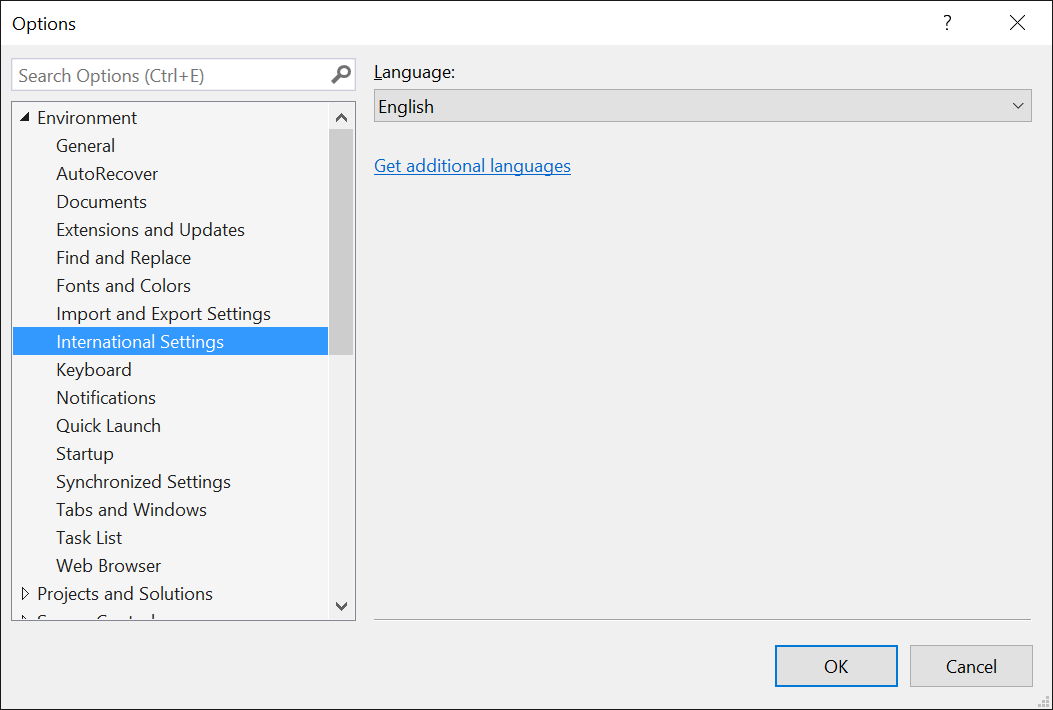
A. It should. However, we haven’t done extensive testing in non-US English locales. For the best experience with the Preview bits, please set your local to English in Visual Studio. You can do so through Tools / Options dialog box, setting International Settings Language to English. If English is not available in the drop-down, you’ll need to install the Visual Studio Language pack.
Q. Will RTVS work with 32-bit editions of R?
A. No. RTVS only supports 64-bit editions of R.
Q. What are the key missing features of RTVS currently?
A. There a number of these. For example:
- There is no UI for package installation or creation
- Variable Explorer does not allow edit, search, sort and supports global scope only
- Refactoring in the Editor
- Rendering Shiny apps in a VS window. We currently render using the default browser
- Interactive ggviz plots in a VS window. We currently render using the default browser
- Customization options when saving plots as PDF or bitmaps
Q. I really like my current Visual Studio settings, but I want to try out the new Data Science settings. What should I do?
A. You can always save your current Visual Studio settings through Tools -> Import and Export Settings… command. You can also use this command to restore one of the default Visual Studio settings (e.g., C++ or General).
Q. What is the recommended .gitignore settings for an RTVS project?
A. Github maintains a master repository of recommended .gitignore files. You can see it here: R .gitignore
Q. Can I store my Visual Studio project on a network share?
A. No. This is not a supported scenario for Visual Studio.
FeedbackWe’re looking for your feedback! Please use the R Tools / Feedback menu to send us smiles and frowns!
ContributingIf you’re interested in contributing to the docs or samples, feel free to clone the repository and submit a pull request. More instructions can be found in our contribution guide.




 京公网安备 11010802022788号