


 发帖
发帖
 雷达卡
雷达卡


基于昇腾CANN构建高效且易用的Ascend C算子测试工具——精度与性能一体化验证方案
环境搭建
使用华为云Notebook服务,加载指定镜像以确保开发环境一致性:
swr.cn-southwest-2.myhuaweicloud.com/chenhui/cann8.3.rc1_python_3_9:3.0
项目获取
从远程仓库拉取完整项目代码,初始化本地工作空间。
git clone https://gitcode.com/cann/ops-math.git
git clone https://gitee.com/sutonghua/ascendoptest.git
算子编译流程
完成源码获取后,进入算子目录并执行编译指令,生成目标算子二进制文件。
source /home/ma-user/Ascend/ascend-toolkit/set_env.sh
cd ops-math
bash build.sh --pkg --soc=ascendxxxx --ops=add_example
安装部署
将编译完成的算子模块进行安装,使其可被后续测试框架调用。
./build_out/cann-ops-math-custom_linux-aarch64.run测试前准备
确保测试运行环境已正确配置,包括依赖库、路径设置及设备状态检查。
cd ascendoptest
pip install ml_dtypes
关键环境变量设置
根据CANN运行时要求,配置必要的环境变量,保障算子能够正常加载和执行。
export LD_LIBRARY_PATH=/home/ma-user/Ascend/ascend-toolkit/latest/opp/vendors/custom_math/op_api/lib/:${LD_LIBRARY_PATH}
export LD_LIBRARY_PATH=/home/ma-user/Ascend/ascend-toolkit/latest/tools/simulator/Ascendxxxxx/lib:$LD_LIBRARY_PATH
算子信息定义文件创建
新建JSON格式的算子描述文件,用于声明输入输出参数结构。示例如下:
[
  {
    "op": "AddExample",
    "input_desc": [
      {
        "name": "x",
        "param_type": "required",
        "format": ["ND", "ND"],
        "type": ["float", "int32"]
      },
      {
        "name": "y",
        "param_type": "required",
        "format": ["ND", "ND"],
        "type": ["float", "int32"]
      }
    ],
    "output_desc": [
      {
        "name": "z",
        "param_type": "required",
        "format": ["ND", "ND"],
        "type": ["float", "int32"]
      }
    ]
  }
]
add_example_prototype.json测试用例配置文件生成
依次创建多个测试场景所需的配置文件,适配不同数据类型与维度组合。
add_example_cases.json[
{
"case_name": "Test_001",
"op_name": "AddExample",
"case_path": "",
"expect_func":"./custom_add.py:custom_add",
"input_desc": [
{
"name": "x",
"format": "ND",
"data_type": "float",
"param_type":"required",
"shape": [32,4,4,4],
"data_path":"",
"value_range":[0,100]
},
{
"name": "y",
"format": "ND",
"data_type": "float",
"param_type":"required",
"shape": [32,4,4,4],
"data_path":"",
"value_range":[0,100]
}
],
"output_desc": [
{
"name": "z",
"format": "ND",
"data_type": "float",
"param_type":"required",
"shape": [32,4,4,4],
"data_path":"",
"golden_path":"",
"err_threshold":[0.001,0.001]
}
],
"attr_desc": [
]
}
]新增测试项支持
扩展测试覆盖范围,添加新的功能测试条目。
custom_add.pydef custom_add(a, b):
c = a + b
return [c]精度验证测试
运行精度比对脚本,评估自定义算子在多种输入条件下的数值准确性。
python run_test.py -i add_example_prototype.json -c add_example_cases.json --op-type "custom" --op-path "/home/ma-user/Ascend/ascend-toolkit/latest/opp/vendors/custom_math/op_api"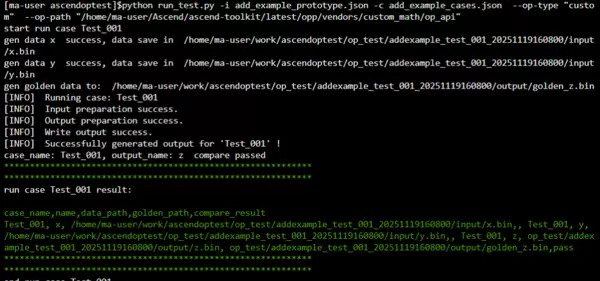
Application级别性能测试
模拟实际应用场景,测量端到端执行时间与资源消耗情况。
python run_test.py -i add_example_prototype.json -c add_example_cases.json --op-type "custom" --op-path "/home/ma-user/Ascend/ascend-toolkit/latest/opp/vendors/custom_math/op_api" --msprof -d ./msprof
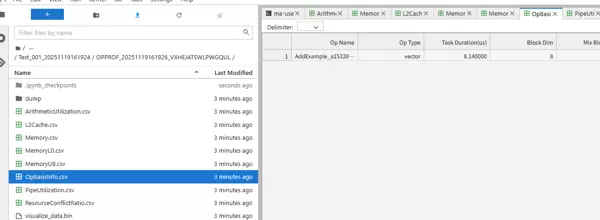
Op级别性能测试
针对单个算子进行细粒度性能打点,分析其在NPU上的执行效率。
python run_test.py -i add_example_prototype.json -c add_example_cases.json  --op-type "custom"  --op-path "/home/ma-user/Ascend/ascend-toolkit/latest/opp/vendors/custom_math/op_api" --msprof --op -d ./msprof


"""
2025-11-19 16:19:35 [INFO]  Performance Summary Report:

        1) MTE2 bandwidth utilization lower than 80% when active.
        2) MTE3 bandwidth utilization lower than 80% when active.
        3) aivector compute usage lower than 20%.

2025-11-19 16:19:35 [INFO]  Operator Basic Information:

        Op Name: AddExample_a1532827238e1555db7b997c7bce2928_high_performance_0
        Op Type: vector
        Task Duration(us): 8.140000
        Block Dim: 8
        Mix Block Dim:
        Device Id: 0
        Pid: 98883
        Current Freq: N/A
        Rated Freq: 1650

2025-11-19 16:19:35 [INFO]  Profiling results saved in /home/ma-user/work/ascendoptest/msprof/Test_001_20251119161924/OPPROF_20251119161926_VXHEJATSWLPWGQUL
2025-11-19 16:19:35 [INFO]  Profiling data parse finished.
2025-11-19 16:19:35 [INFO]  Op profiling finish. Welcome to next use.
case_name: Test_001, output_name: z  compare passed
************************************************************
************************************************************
run case Test_001 result:

case_name,name,data_path,golden_path,compare_result
Test_001, x, /home/ma-user/work/ascendoptest/op_test/addexample_test_001_20251119161924/input/x.bin,, Test_001, y, /home/ma-user/work/ascendoptest/op_test/addexample_test_001_20251119161924/input/y.bin,, Test_001, z, op_test/addexample_test_001_20251119161924/output/z.bin, op_test/addexample_test_001_20251119161924/output/golden_z.bin,pass
************************************************************
************************************************************
end run case Test_001
"""
Op Simulator仿真测试
利用模拟器环境对算子行为进行预测性验证,辅助调试与优化。
python run_test.py -i add_example_prototype.json -c add_example_cases.json  --op-type "custom"  --op-path "/home/ma-user/Ascend/ascend-toolkit/latest/opp/vendors/custom_math/op_api" --msprof --op  --sim -d ./msprof

"""
start run case Test_001
gen data x  success, data save in  /home/ma-user/work/ascendoptest/op_test/addexample_test_001_20251119162308/input/x.bin
gen data y  success, data save in  /home/ma-user/work/ascendoptest/op_test/addexample_test_001_20251119162308/input/y.bin
gen golden data to:  /home/ma-user/work/ascendoptest/op_test/addexample_test_001_20251119162308/output/golden_z.bin
2025-11-19 16:23:10 [INFO]  Op profiling analysis start.
2025-11-19 16:23:10 [INFO]  Running simulation task: Binary Simulation Running, use simulator in LD_LIBRARY_PATH
[INFO]  Running case: Test_001
[INFO] Config file [config_stars.json] from environment variable [CAMODEL_CONFIG_PATH]. Path: /home/ma-user/work/ascendoptest/msprof/Test_001_20251119162308/OPPROF_20251119162310_JNDLRIBCWWWNCXVK/device0/tmp_dump/config/config_stars.json
[INFO] Config file is found, path is /home/ma-user/work/ascendoptest/msprof/Test_001_20251119162308/OPPROF_20251119162310_JNDLRIBCWWWNCXVK/device0/tmp_dump/config/config_stars.json.
[FuncCache]: size:0x20000, line_size:128, way_num:16, line_num:1024, idx_num:64
             idx_lsb:7, idx_mask:0x3f, tag_lsb:13, tag_mask:0xffffffffffffffff, ofst_mask:0x7f

[TmSim]: Run in parallel worker mode, core num is: 24

[INFO] Config file [config.json] from environment variable [CAMODEL_CONFIG_PATH]. Path: /home/ma-user/work/ascendoptest/msprof/Test_001_20251119162308/OPPROF_20251119162310_JNDLRIBCWWWNCXVK/device0/tmp_dump/config/config.json
[INFO] AicWrapper attach AIC 0, num_vec_core=2, num_subcore=3
[INFO] AicWrapper attach AIC 1, num_vec_core=2, num_subcore=3
[INFO] AicWrapper attach AIC 2, num_vec_core=2, num_subcore=3
[INFO] AicWrapper attach AIC 3, num_vec_core=2, num_subcore=3
[INFO] AicWrapper attach AIC 4, num_vec_core=2, num_subcore=3
[INFO] AicWrapper attach AIC 5, num_vec_core=2, num_subcore=3
[INFO] AicWrapper attach AIC 6, num_vec_core=2, num_subcore=3
[INFO] AicWrapper attach AIC 7, num_vec_core=2, num_subcore=3
[INFO] AicWrapper attach AIC 8, num_vec_core=2, num_subcore=3
[INFO] AicWrapper attach AIC 9, num_vec_core=2, num_subcore=3
[INFO] AicWrapper attach AIC 10, num_vec_core=2, num_subcore=3
[INFO] AicWrapper attach AIC 11, num_vec_core=2, num_subcore=3
[INFO] AicWrapper attach AIC 12, num_vec_core=2, num_subcore=3
[INFO] AicWrapper attach AIC 13, num_vec_core=2, num_subcore=3
[INFO] AicWrapper attach AIC 14, num_vec_core=2, num_subcore=3
[INFO] AicWrapper attach AIC 15, num_vec_core=2, num_subcore=3
[INFO] AicWrapper attach AIC 16, num_vec_core=2, num_subcore=3
[INFO] AicWrapper attach AIC 17, num_vec_core=2, num_subcore=3
[INFO] AicWrapper attach AIC 18, num_vec_core=2, num_subcore=3
[INFO] AicWrapper attach AIC 19, num_vec_core=2, num_subcore=3
[INFO] AicWrapper attach AIC 20, num_vec_core=2, num_subcore=3
[INFO] AicWrapper attach AIC 21, num_vec_core=2, num_subcore=3
[INFO] AicWrapper attach AIC 22, num_vec_core=2, num_subcore=3
[INFO] AicWrapper attach AIC 23, num_vec_core=2, num_subcore=3
[INFO] Chip 0 AIC / Scheduler / Soc periods: 200.0000 / 200.0000 / 105.0000
[INFO] chip 0 die 0 device created
>> Start ModelParsim with 24 threads for 25 thread units, mode is 0
================================================================================
>>>>
>>>>                             " PEM MODEL "
>>>>             Total no. of 1 chip(s) Model Init Success!
>>>>
================================================================================
[INFO] Model Start Time: 2025-11-19 16:23:12
[DRVSTUB_LOG] driver_api.c:550 sendSwapBuf:swapbuf_base_addr:10000000
[DRVSTUB_LOG] driver_api.c:551 sendSwapBuf:sq:0 swapbuf_addr:10000000
[DRVSTUB_LOG] driver_api.c:550 sendSwapBuf:swapbuf_base_addr:10000000
[DRVSTUB_LOG] driver_api.c:551 sendSwapBuf:sq:1 swapbuf_addr:10000040
[DRVSTUB_LOG] driver_api.c:550 sendSwapBuf:swapbuf_base_addr:10000000
[DRVSTUB_LOG] driver_api.c:551 sendSwapBuf:sq:2 swapbuf_addr:10000080
[INFO]  Input preparation success.
[INFO]  Output preparation success.
[INFO] <ProfInit> Start profiling on kernel: AddExample_a1532827238e1555db7b997c7bce2928_high_performance_0
2025-11-19 16:23:15 [INFO]  Extract 722 relations from kernel
2025-11-19 16:23:15 [WARN]  Kernel missed debug_line information. If you need code call stack, please recompile kernel with -g option
[DRVSTUB_LOG] driver_api.c:2213 send_stars_interrupt:get cq_0 base_addr: 10020000
[INFO]  Write output success.
[INFO] Model Stop Time: 2025-11-19 16:23:21
Model RUN TIME: 8923.83 ms
[INFO] Total tick: 42142
[INFO] Model stopped successfully.
[INFO]  Successfully generated output for 'Test_001' !
2025-11-19 16:23:25 [WARN]  Code call stack is empty
2025-11-19 16:23:25 [WARN]  Lack of code info of files
2025-11-19 16:23:25 [INFO]  Core operator results run in simulator as follow:
core_name           duration_time(us)   running_time(us)
core0.veccore0      7.56                7.13
core1.veccore0      7.55                7.14
core2.veccore0      7.56                7.14
core3.veccore0      7.55                7.14
core4.veccore0      7.55                7.13
core5.veccore0      7.56                7.13
core6.veccore0      7.55                7.13
core7.veccore0      7.33                7.07
2025-11-19 16:23:26 [INFO]  Profiling running finished. All task success.
2025-11-19 16:23:26 [INFO]  Start parse dump file
2025-11-19 16:23:26 [INFO]  Profiling results saved in /home/ma-user/work/ascendoptest/msprof/Test_001_20251119162308/OPPROF_20251119162310_JNDLRIBCWWWNCXVK
2025-11-19 16:23:26 [INFO]  Profiling data parse finished.
2025-11-19 16:23:26 [INFO]  Op profiling finish. Welcome to next use.
case_name: Test_001, output_name: z  compare passed
************************************************************
************************************************************
run case Test_001 result:

case_name,name,data_path,golden_path,compare_result
Test_001, x, /home/ma-user/work/ascendoptest/op_test/addexample_test_001_20251119162308/input/x.bin,, Test_001, y, /home/ma-user/work/ascendoptest/op_test/addexample_test_001_20251119162308/input/y.bin,, Test_001, z, op_test/addexample_test_001_20251119162308/output/z.bin, op_test/addexample_test_001_20251119162308/output/golden_z.bin,pass
************************************************************
************************************************************
end run case Test_001
"""
参考文档
性能分析相关内容详见官方技术手册:《工具概述 - CANN商用版8.3.RC1》 昇腾社区发布版本。

 京公网安备 11010802022788号






