


 发帖
发帖
 雷达卡
雷达卡



By hadleywickham
[url=]inShare[/url]188
(This article was first published on RStudio Blog, and kindly contributed to R-bloggers)
I’m very pleased to announce the release of ggplot2 2.0.0. I know I promised that there wouldn’t be any more updates, but while working on the 2nd edition of the ggplot2 book, I just couldn’t stop myself from fixing some long standing problems.
On the scale of ggplot2 releases, this one is huge with over one hundred fixes and improvements. This might break some of your existing code (although I’ve tried to minimise breakage as much as possible), but I hope the new features make up for any short term hassle. This blog post documents the most important changes:
- ggplot2 now has an official extension mechanism.
- There are a handful of new geoms, and updates to existing geoms.
- The default appearance has been thoroughly tweaked so most plots should look better.
- Facets have a much richer set of labelling options.
- The documentation has been overhauled to be more helpful, and require less integration across multiple pages.
- A number of older and less used features have been deprecated.
ExtensibilityPerhaps the bigggest news in this release is that ggplot2 now has an official extension mechanism. This means that others can now easily create their on stats, geoms and positions, and provide them in other packages. This should allow the ggplot2 community to flourish, even as less development work happens in ggplot2 itself. See vignette("extending-ggplot2") for details.
Coupled with this change, ggplot2 no longer uses proto or reference classes. Instead, we now use ggproto, a new OO system designed specifically for ggplot2. Unlike proto and RC, ggproto supports clean cross-package inheritance, which is necessary for extensibility. Creating a new OO system isn’t usually the right solution, but I’m pretty sure it was necessary here. Read more about it in the vignette.
New and updated geoms
- ggplot no longer throws an error if you your plot has no layers. Instead it automatically adds geom_blank():ggplot(mpg, aes(cyl, hwy))

- geom_count() (a new alias for the old stat_sum()) counts the number of points at unique locations on a scatterplot, and maps the size of the point to the count:ggplot(mpg, aes(cty, hwy)) + geom_point()ggplot(mpg, aes(cty, hwy)) + geom_count()


- geom_curve() draws curved lines in the same way thatgeom_segment() draws straight lines:df <- expand.grid(x = 1:2, y = 1:2)ggplot(df, aes(x, y, xend = x + 0.5, yend = y + 0.5)) + geom_curve(aes(colour = "curve")) + geom_segment(aes(colour = "segment"))
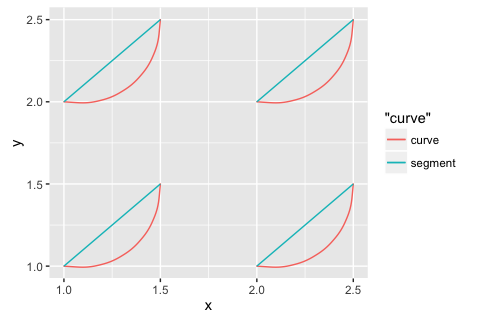
- geom_bar() now behaves differently from geom_histogram(). Instead of binning the data, it counts the number of unique observations at each location:ggplot(mpg, aes(cyl)) + geom_bar()ggplot(mpg, aes(cyl)) + geom_histogram(binwidth = 1)



 京公网安备 11010802022788号






