


 发帖
发帖
 雷达卡
雷达卡



开发环境:
win10 + Microsoft Visual C++ Build Tools 2015
-----------------------------------------------------------------
The Microsoft Visual C++ Build Tools installs only the command-line compiler, tools, and libraries you need to build C and C++ programs. It's perfect for build labs or classroom exercises and installs relatively quickly. To install only the command-line tools, download and install Microsoft Visual C++ Build Tools 2015.
The following tools can help you to build a C/C++ project on the command line.
1. CL
Use the compiler (cl.exe) to compile and link source code files into apps, libraries, and DLLs.
2. Link
Use the linker (link.exe) to link compiled object files and libraries into apps and DLLs.
3. MSBuild (Visual C++)
Use MSBuild (msbuild.exe) to build Visual C++ projects and Visual Studio solutions. This is equivalent to running the Build project or Build Solution command in the Visual Studio IDE.
4. DEVENV
Use DEVENV (devenv.exe) combined with a command-line switch—for example, /Build or /Clean—to perform certain build commands without displaying the Visual Studio IDE.
5. NMAKE
Use NMAKE (nmake.exe) to automate tasks that build Visual C++ projects by using a traditional makefile.
在windows下开发应用或库时,如果不想安装完整的visual studio,可以选择只安装build tools在命令行下进行编译等操作。这样可以节省硬盘空间,实测占用7GB,并且装在了C盘。
1. 下载安装
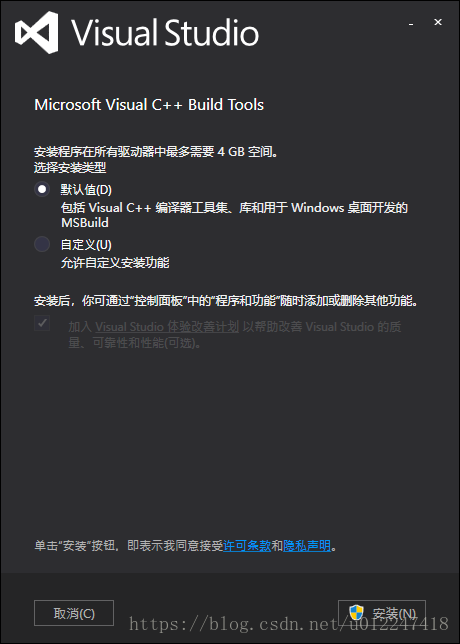
打开链接下载安装程序: Microsoft Visual C++ Build Tools 2015,双击visualcppbuildtools_full.exe,选择默认即可,点击安装,等待10分钟左右即可完成安装。
2. 准备代码hello_world.c
#include<stdio.h>int main(){ printf("hello vs build tools.\n"); printf("press any key to exit.\n"); getchar(); return 0;}3. 编译
1)在开始菜单中选择Visual C++ 2015 x86 Native Tools Command Prompt打开命令行,然后切换到hello_world.c所在目录。
2)执行:cl hello_world.c
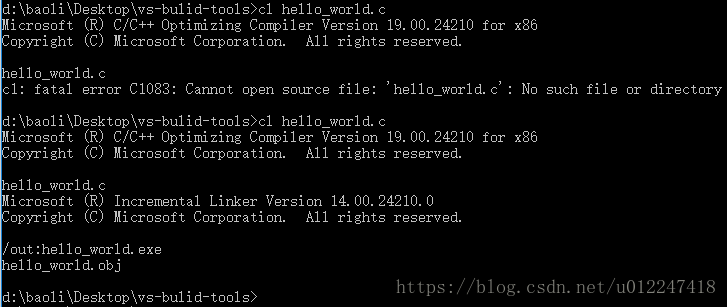
可看到生成两个文件,分别是hello_world.obj和hello_world.exe
4. 测试
执行:.\hello_world.exe

或直接双击hello_world.exe执行。

 京公网安备 11010802022788号






